


 Object Model

Syntax
| Visual Basic (Declaration) | |
|---|---|
Public NotInheritable Class HelperServices | |
| C# | |
|---|---|
public sealed class HelperServices | |
Remarks
This class contains properties to obtain information (most importantly the Url) for various special asynchronous web services available on ArcGIS Online (AGOL) or ArcGIS Portal. The HelperServices.GeocodeServices Property provides information for geocoding (aka. locator) tasks. The HelperServices.GeometryService Property provides information for various geometry tasks (for example: buffer, project, intersect, etc.). The HelperServices.PrintTaskService Property provides information for printing tasks. The HelperServices.RouteService Property provides information for routing tasks. To obtain a Portal.HelperServices object, use the Portal.ArcGISPortalInfo.HelperServices Property.
You do not have to be a logged in user using the IdentityManager to get information for the Portal.ArcGISPortalInfo object. You can gain this information from anonymous access. However, to obtain information about the Portal.ArcGISPortalInfo object that has a Portal.PortalAccess level of Private or Shared you need to use the IdentityManager by supplying the appropriate username/password credentials. As AGOL and ArcGIS Portal require the use of long term tokens to access secured information (i.e. information that is Private/Shared), you should remember to set the IdentityManager.TokenGenerationReferer Property to the correct string required by your development platform.
Example
How to use:
Set the correct values for the example code initialization variables in the code-behind (the user needs to provide the ArcGIS Online (AGOL) or ArcGIS Portal base Url, credentials via username/password if wanting to access secured services). Once the user information is provided, click the button to make Asynchronous calls to the AGOL/ArcGIS Portal server to retrieve information for HelperServices available.
The XAML code in this example is used in conjunction with the code-behind (C# or VB.NET) to demonstrate the functionality.
The following screen shot corresponds to the code example in this page.
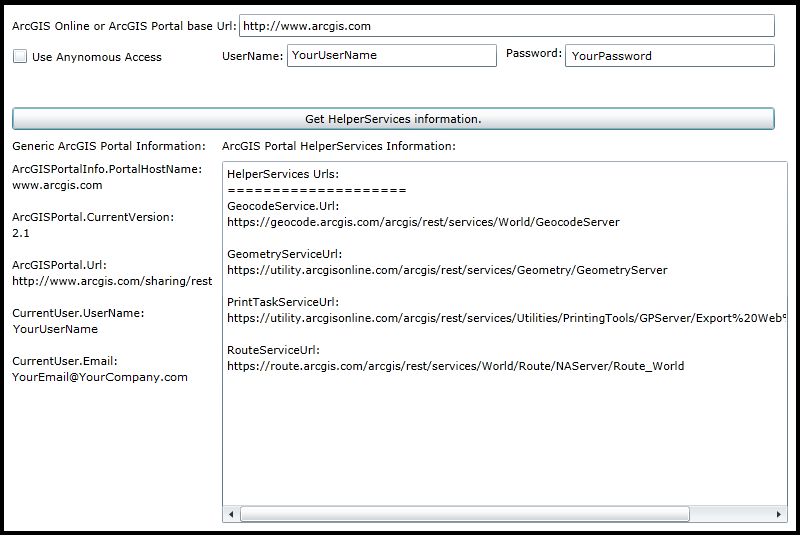
| XAML |  Copy Code Copy Code |
|---|---|
<Grid x:Name="LayoutRoot" Background="White"> <!-- Information the user needs to supply. --> <!-- Get the ArcGIS Online/ArcGIS Portal base Url. --> <sdk:Label Height="28" HorizontalAlignment="Left" Margin="12,83,0,0" Name="Label_ArcGISPortalBaseUrl" VerticalAlignment="Top" Width="231" Content="ArcGIS Online or ArcGIS Portal base Url:"/> <TextBox Height="23" HorizontalAlignment="Left" Margin="239,79,0,0" Name="TextBox_ArcGISPortalBaseUrl" VerticalAlignment="Top" Width="536" /> <!-- Use Anonymous access or IdentityManager with user credentials to access the information about HelperServices. --> <CheckBox Content="Use Anynomous Access" Height="16" Margin="12,113,0,0" Name="CheckBox_UseAnonymousAccess" VerticalAlignment="Top" HorizontalAlignment="Left" Width="165" Click="CheckBox_UseAnonymousAccess_Click" /> <sdk:Label Height="28" HorizontalAlignment="Left" Margin="222,113,0,0" Name="Label_UserName" VerticalAlignment="Top" Width="70" Content="UserName:"/> <TextBox Height="23" HorizontalAlignment="Left" Margin="287,109,0,0" Name="TextBox_UserName" VerticalAlignment="Top" Width="210" /> <sdk:Label Height="28" HorizontalAlignment="Left" Margin="506,110,0,0" Name="Label_Password" VerticalAlignment="Top" Width="56" Content="Password:"/> <TextBox Height="23" HorizontalAlignment="Left" Margin="565,109,0,0" Name="TextBox_Password" VerticalAlignment="Top" Width="210" /> <!-- Button to invoke searching for HelperServices on ArcGIS Online/ArcGIS Portal--> <Button Content="Get HelperServices information." Height="23" HorizontalAlignment="Left" Margin="12,172,0,0" Name="Button1" VerticalAlignment="Top" Width="763" Click="Button1_Click" /> <!-- Display the results to the user. --> <sdk:Label Height="28" HorizontalAlignment="Left" Margin="12,203,0,0" Name="Label_GenericInfo" VerticalAlignment="Top" Width="202" Content="Generic ArcGIS Portal Information:"/> <TextBlock Height="362" HorizontalAlignment="Left" Margin="12,226,0,0" Name="TextBlock_GenericInfo" VerticalAlignment="Top" Width="200" /> <sdk:Label Height="28" HorizontalAlignment="Left" Margin="222,203,0,0" Name="Label_HelperServicesInfo" VerticalAlignment="Top" Width="241" Content="ArcGIS Portal HelperServices Information:"/> <ListBox Height="362" HorizontalAlignment="Left" Margin="222,226,0,0" Name="ListBox_HelperServicesInfo" VerticalAlignment="Top" Width="566" /> <!-- Provide the instructions on how to use the sample code. --> <TextBlock Height="73" HorizontalAlignment="Left" Name="TextBlock1" VerticalAlignment="Top" Width="788" TextWrapping="Wrap" Text="Set the correct values for the example code initialization variables in the code-behind (the user needs to provide the ArcGIS Online (AGOL) or ArcGIS Portal base Url, credentials via username/password if wanting to access secured services). Once the user information is provided, click the button to make Asynchronous calls to the AGOL/ArcGIS Portal server to retrieve information for HelperServices available." /> </Grid> | |
| C# | Copy Code |
|---|---|
public MainPage() { InitializeComponent(); // TODO: Provide your default values to run the example code. // ========================================================== // Provide the Url to ArcGIS OnLine (AGOL) or your ArcGIS Portal. TextBox_ArcGISPortalBaseUrl.Text = "http://www.arcgis.com"; // If gaining access to secured services on AGOL/Portal provide Username/Password information. TextBox_UserName.Text = "YourUserName"; TextBox_Password.Text = "YourPassword"; } private void Button1_Click(object sender, System.Windows.RoutedEventArgs e) { // This sub-routine executes when the user clicks the Button. The purpose is to get general information about the // AGOL/Portal service (including user information if trying to access a secured service). Additionally, information // about an HelperServices is returned. // Clear out any existing results before proceeding. TextBlock_GenericInfo.Text = ""; ListBox_HelperServicesInfo.Items.Clear(); // Set the referer string of the IdentityManager using the .TokenGenrationReferer Property. // This will establish the referer string that is part of the Http WebRequest Header. // FYI: You can view the 'Referer' header information in freeware/shareware applications like 'Fiddler'. // NOTE: // For WPF this value could be any string. // Ex: "http://www.MyWebSite.com", "http", "h", "Whatever". // For Silverlight this value should point to the .xap file, but any sub-string will do. // Ex: "http://localhost:65121/ClientBin/SL-App.xap", "http", "h". // For Windows Phone this value should point to the application install location on the device, but any sub-string will do. // Ex: "file://Applications/Install/868A84BA-237D-4980-BF51-74E193CECCF1/Install/", "file", "f". ESRI.ArcGIS.Client.IdentityManager.GenerateTokenOptions myGenerateTokenOptions = null; myGenerateTokenOptions = new ESRI.ArcGIS.Client.IdentityManager.GenerateTokenOptions(); myGenerateTokenOptions.Referer = "h"; // Get the base Url for AGOL/Portal. string myArcGISPortalBaseUrl = TextBox_ArcGISPortalBaseUrl.Text; // Get the Username/Password for accessing secured AGOL/Portal services. string myUserName = TextBox_UserName.Text; string myPassword = TextBox_Password.Text; // Use IdentityManager to access secured AGOL/Portal services. This will cause an asynchronous call to the // sub-routine called CALLBACK_IdentityManager_GenerateCredentialAsync. ESRI.ArcGIS.Client.IdentityManager.Current.GenerateCredentialAsync(myArcGISPortalBaseUrl, myUserName, myPassword, CALLBACK_IdentityManager_GenerateCredentialAsync, myGenerateTokenOptions); } private void CALLBACK_IdentityManager_GenerateCredentialAsync(ESRI.ArcGIS.Client.IdentityManager.Credential myCredential, System.Exception ex) { // This sub-routine executes as a result of the IdentityManager.GenerateCredentialAsync Method. // Ensure there was not a problem in the returned results. if (ex == null) { // Create a new instance of the ArcGISPortal Class. ESRI.ArcGIS.Client.Portal.ArcGISPortal myArcGISPortal = new ESRI.ArcGIS.Client.Portal.ArcGISPortal(); // Determine if we are going to really use the IdentityManager result to get information from AGOL/Portal. if (CheckBox_UseAnonymousAccess.IsChecked == false) { // The user wants to use their username/password to access secured AGOL/Portal services. Using this option will // display Private information to which the logged in user owns or is the administrator of. // Set the ArcGISPortal.Token Property to the IdentityManager.Credential long term token. // Long term tokens are necessary to access secured AGOL/Portal services. myArcGISPortal.Token = myCredential.Token; } else { // The user wants to access publically available information from AGOL/Portal services. Private information will not // be displayed using this option. // The need to use the ArcGISPortal.Token is NOT necessary. } // Get the base Url of the AGOL/portal site. string myArcGISPortalBaseUrl = TextBox_ArcGISPortalBaseUrl.Text; // Add the other necessary parts to the base Url string so that information can be accessed on AGOL/Portal. string myArcGISPortalEnhancedUrl = myArcGISPortalBaseUrl + "/sharing/rest"; // Make an asynchronous call to obtain information from AGOL/Portal. Upon successful completion of this call // you can then gain access to deeper levels of information using other ArcGISPortal asynchronous calls like: // .SearchGroupsAsync, .SearchItemsAsnyc, and .SearchUsersAsync. myArcGISPortal.InitializeAsync(myArcGISPortalEnhancedUrl, CALLBACK_Portal_InitializeAsync); } else { // There was some problem with the IdentityManager.GenerateCredentialAsync call. Display the message to the user. MessageBox.Show("Could not log in. Please check credentials."); } } private void CALLBACK_Portal_InitializeAsync(ESRI.ArcGIS.Client.Portal.ArcGISPortal myArcGISPortal, System.Exception ex) { // This sub-routine executes as a result of the ArcGISPortal.InitializeAsync Method. // Ensure there was not a problem in the returned results. if (ex == null) { // NOTE: Logging in with anonymous access will not diplay as much property information -vs- logging in with // credentials for the Organization. // Get the ArcGISPortalInfo object from ArcGISPortal. ESRI.ArcGIS.Client.Portal.ArcGISPortalInfo myArcGISPortalInfo = myArcGISPortal.ArcGISPortalInfo; // Get the ArcGISPortalInfo.PortalHostname information. string myPortalHostName = ""; if (myArcGISPortalInfo != null) { myPortalHostName = myArcGISPortalInfo.PortalHostname; } // Get the ArcGISPortal.CurrentUser object. Initialize some string variables for the username and email of the // CurrentUser. If we have a valid CurrentUser get that information. If the user tries to get information using // anonymous access the default string values of "[NOT AVAILABLE]" are provided. ESRI.ArcGIS.Client.Portal.ArcGISPortalUser myCurrentUser = myArcGISPortal.CurrentUser; string myUserName = "[NOT AVAILABLE]"; string myEmail = "[NOT AVAILABLE]"; if (myCurrentUser != null) { myUserName = myCurrentUser.UserName; myEmail = myCurrentUser.Email; } // Get the CurrentVerion of the AGOL/Portal server. string myCurrentVersion = myArcGISPortal.CurrentVersion; // Get the Url of the AGOL/Portal server. string myUrl = myArcGISPortal.Url; // Create a StringBuilder class to hold information obtained from the AGOL/Portal service. System.Text.StringBuilder myStringBuilder = new System.Text.StringBuilder(); myStringBuilder.Append("ArcGISPortalInfo.PortalHostName: " + Environment.NewLine + myPortalHostName + Environment.NewLine + Environment.NewLine); myStringBuilder.Append("ArcGISPortal.CurrentVersion: " + Environment.NewLine + myCurrentVersion + Environment.NewLine + Environment.NewLine); myStringBuilder.Append("ArcGISPortal.Url: " + Environment.NewLine + myUrl + Environment.NewLine + Environment.NewLine); myStringBuilder.Append("CurrentUser.UserName: " + Environment.NewLine + myUserName + Environment.NewLine + Environment.NewLine); myStringBuilder.Append("CurrentUser.Email: " + Environment.NewLine + myEmail + Environment.NewLine + Environment.NewLine); // Display the information about the AGOL/Portal server to the user. TextBlock_GenericInfo.Text = myStringBuilder.ToString(); //---------------------------------------------------------------------------------------------------------------- // Get the HelperServices object information. ESRI.ArcGIS.Client.Portal.HelperServices myHelperServices = myArcGISPortalInfo.HelperServices; // Get the Geocoding services available. // NOTE: Get just the first on in this example (TODO: loop through if you have more that one to access). System.Collections.Generic.IEnumerable<ESRI.ArcGIS.Client.Portal.GeocodeService> myGeocodeServices = myHelperServices.GeocodeServices; string myGeocodeServiceUrl = myGeocodeServices.FirstOrDefault().Url; // Get the Geometry services available. ESRI.ArcGIS.Client.Portal.GeometryService myGeometryService = myHelperServices.GeometryService; string myGeometryServiceUrl = myGeometryService.Url; // Get the Printing services available. ESRI.ArcGIS.Client.Portal.PrintTaskService myPrintTaskService = myHelperServices.PrintTaskService; string myPrintTaskServiceUrl = myPrintTaskService.Url; // Get the Routing (aka Location) services available. ESRI.ArcGIS.Client.Portal.RouteService myRouteService = myHelperServices.RouteService; string myRouteServiceUrl = myRouteService.Url; // Create a StringBuilder class to hold information obtained from the HelperServices object. System.Text.StringBuilder myStringBuilder2 = new System.Text.StringBuilder(); myStringBuilder2.Append("HelperServices Urls:" + Environment.NewLine); myStringBuilder2.Append("====================" + Environment.NewLine); myStringBuilder2.Append("GeocodeService.Url: " + Environment.NewLine + myGeocodeServiceUrl + Environment.NewLine + Environment.NewLine); myStringBuilder2.Append("GeometryServiceUrl: " + Environment.NewLine + myGeometryServiceUrl + Environment.NewLine + Environment.NewLine); myStringBuilder2.Append("PrintTaskServiceUrl: " + Environment.NewLine + myPrintTaskServiceUrl + Environment.NewLine + Environment.NewLine); myStringBuilder2.Append("RouteServiceUrl: " + Environment.NewLine + myRouteServiceUrl + Environment.NewLine + Environment.NewLine); // Display the information about the HelperServices to the user. ListBox_HelperServicesInfo.Items.Add(myStringBuilder2.ToString()); } else { // There was some problem with the ArcGISPortal.InitializeAsync call. Display the message to the user. MessageBox.Show("Failed to initialize" + ex.Message.ToString()); } } private void CheckBox_UseAnonymousAccess_Click(object sender, System.Windows.RoutedEventArgs e) { // This sub-routine execute when the user checks on/off the ability to get information about AGOL/Portal // using anonymous access or via the IdentityManager with a username/password for secured web services. if (CheckBox_UseAnonymousAccess.IsChecked == true) { // The user wants to have anonymous access to get AGOL/Portal information. // Hide the username/password controls. Label_Password.Visibility = System.Windows.Visibility.Collapsed; Label_UserName.Visibility = System.Windows.Visibility.Collapsed; TextBox_Password.Visibility = System.Windows.Visibility.Collapsed; TextBox_UserName.Visibility = System.Windows.Visibility.Collapsed; } else { // The user wants to have IdentityManager with a username/password access to get AGOL/Portal information. // Show the username/password controls. Label_Password.Visibility = System.Windows.Visibility.Visible; Label_UserName.Visibility = System.Windows.Visibility.Visible; TextBox_Password.Visibility = System.Windows.Visibility.Visible; TextBox_UserName.Visibility = System.Windows.Visibility.Visible; } } | |
| VB.NET | Copy Code |
|---|---|
Public Sub New() InitializeComponent() ' TODO: Provide your default values to run the example code. ' ========================================================== ' Provide the Url to ArcGIS OnLine (AGOL) or your ArcGIS Portal. TextBox_ArcGISPortalBaseUrl.Text = "http://www.arcgis.com" ' If gaining access to secured services on AGOL/Portal provide Username/Password information. TextBox_UserName.Text = "YourUserName" TextBox_Password.Text = "YourPassword" End Sub Private Sub Button1_Click(sender As System.Object, e As System.Windows.RoutedEventArgs) ' This sub-routine executes when the user clicks the Button. The purpose is to get general information about the ' AGOL/Portal service (including user information if trying to access a secured service). Additionally, information ' about an HelperServices is returned. ' Clear out any existing results before proceeding. TextBlock_GenericInfo.Text = "" ListBox_HelperServicesInfo.Items.Clear() ' Set the referer string of the IdentityManager using the .TokenGenrationReferer Property. ' This will establish the referer string that is part of the Http WebRequest Header. ' FYI: You can view the 'Referer' header information in freeware/shareware applications like 'Fiddler'. ' NOTE: ' For WPF this value could be any string. ' Ex: "http://www.MyWebSite.com", "http", "h", "Whatever". ' For Silverlight this value should point to the .xap file, but any sub-string will do. ' Ex: "http://localhost:65121/ClientBin/SL-App.xap", "http", "h". ' For Windows Phone this value should point to the application install location on the device, but any sub-string will do. ' Ex: "file://Applications/Install/868A84BA-237D-4980-BF51-74E193CECCF1/Install/", "file", "f". Dim myGenerateTokenOptions As ESRI.ArcGIS.Client.IdentityManager.GenerateTokenOptions myGenerateTokenOptions = New ESRI.ArcGIS.Client.IdentityManager.GenerateTokenOptions myGenerateTokenOptions.Referer = "h" ' Get the base Url for AGOL/Portal. Dim myArcGISPortalBaseUrl As String = TextBox_ArcGISPortalBaseUrl.Text ' Get the Username/Password for accessing secured AGOL/Portal services. Dim myUserName As String = TextBox_UserName.Text Dim myPassword As String = TextBox_Password.Text ' Use IdentityManager to access secured AGOL/Portal services. This will cause an asynchronous call to the ' sub-routine called CALLBACK_IdentityManager_GenerateCredentialAsync. ESRI.ArcGIS.Client.IdentityManager.Current.GenerateCredentialAsync(myArcGISPortalBaseUrl, myUserName, myPassword, AddressOf CALLBACK_IdentityManager_GenerateCredentialAsync, myGenerateTokenOptions) End Sub Private Sub CALLBACK_IdentityManager_GenerateCredentialAsync(myCredential As ESRI.ArcGIS.Client.IdentityManager.Credential, ex As System.Exception) ' This sub-routine executes as a result of the IdentityManager.GenerateCredentialAsync Method. ' Ensure there was not a problem in the returned results. If ex Is Nothing Then ' Create a new instance of the ArcGISPortal Class. Dim myArcGISPortal As ESRI.ArcGIS.Client.Portal.ArcGISPortal = New ESRI.ArcGIS.Client.Portal.ArcGISPortal ' Determine if we are going to really use the IdentityManager result to get information from AGOL/Portal. If CheckBox_UseAnonymousAccess.IsChecked = False Then ' The user wants to use their username/password to access secured AGOL/Portal services. Using this option will ' display Private information to which the logged in user owns or is the administrator of. ' Set the ArcGISPortal.Token Property to the IdentityManager.Credential long term token. ' Long term tokens are necessary to access secured AGOL/Portal services. myArcGISPortal.Token = myCredential.Token Else ' The user wants to access publically available information from AGOL/Portal services. Private information will not ' be displayed using this option. ' The need to use the ArcGISPortal.Token is NOT necessary. End If ' Get the base Url of the AGOL/portal site. Dim myArcGISPortalBaseUrl As String = TextBox_ArcGISPortalBaseUrl.Text ' Add the other necessary parts to the base Url string so that information can be accessed on AGOL/Portal. Dim myArcGISPortalEnhancedUrl As String = myArcGISPortalBaseUrl + "/sharing/rest" ' Make an asynchronous call to obtain information from AGOL/Portal. Upon successful completion of this call ' you can then gain access to deeper levels of information using other ArcGISPortal asynchronous calls like: ' .SearchGroupsAsync, .SearchItemsAsnyc, and .SearchUsersAsync. myArcGISPortal.InitializeAsync(myArcGISPortalEnhancedUrl, AddressOf CALLBACK_Portal_InitializeAsync) Else ' There was some problem with the IdentityManager.GenerateCredentialAsync call. Display the message to the user. MessageBox.Show("Could not log in. Please check credentials.") End If End Sub Private Sub CALLBACK_Portal_InitializeAsync(myArcGISPortal As ESRI.ArcGIS.Client.Portal.ArcGISPortal, ex As System.Exception) ' This sub-routine executes as a result of the ArcGISPortal.InitializeAsync Method. ' Ensure there was not a problem in the returned results. If ex Is Nothing Then ' NOTE: Logging in with anonymous access will not diplay as much property information -vs- logging in with ' credentials for the Organization. ' Get the ArcGISPortalInfo object from ArcGISPortal. Dim myArcGISPortalInfo As ESRI.ArcGIS.Client.Portal.ArcGISPortalInfo = myArcGISPortal.ArcGISPortalInfo ' Get the ArcGISPortalInfo.PortalHostname information. Dim myPortalHostName As String = "" If myArcGISPortalInfo IsNot Nothing Then myPortalHostName = myArcGISPortalInfo.PortalHostname End If ' Get the ArcGISPortal.CurrentUser object. Initialize some string variables for the username and email of the ' CurrentUser. If we have a valid CurrentUser get that information. If the user tries to get information using ' anonymous access the default string values of "[NOT AVAILABLE]" are provided. Dim myCurrentUser As ESRI.ArcGIS.Client.Portal.ArcGISPortalUser = myArcGISPortal.CurrentUser Dim myUserName As String = "[NOT AVAILABLE]" Dim myEmail As String = "[NOT AVAILABLE]" If myCurrentUser IsNot Nothing Then myUserName = myCurrentUser.UserName myEmail = myCurrentUser.Email End If ' Get the CurrentVerion of the AGOL/Portal server. Dim myCurrentVersion As String = myArcGISPortal.CurrentVersion ' Get the Url of the AGOL/Portal server. Dim myUrl As String = myArcGISPortal.Url ' Create a StringBuilder class to hold information obtained from the AGOL/Portal service. Dim myStringBuilder As New Text.StringBuilder myStringBuilder.Append("ArcGISPortalInfo.PortalHostName: " + vbCrLf + myPortalHostName + vbCrLf + vbCrLf) myStringBuilder.Append("ArcGISPortal.CurrentVersion: " + vbCrLf + myCurrentVersion + vbCrLf + vbCrLf) myStringBuilder.Append("ArcGISPortal.Url: " + vbCrLf + myUrl + vbCrLf + vbCrLf) myStringBuilder.Append("CurrentUser.UserName: " + vbCrLf + myUserName + vbCrLf + vbCrLf) myStringBuilder.Append("CurrentUser.Email: " + vbCrLf + myEmail + vbCrLf + vbCrLf) ' Display the information about the AGOL/Portal server to the user. TextBlock_GenericInfo.Text = myStringBuilder.ToString '---------------------------------------------------------------------------------------------------------------- ' Get the HelperServices object information. Dim myHelperServices As ESRI.ArcGIS.Client.Portal.HelperServices = myArcGISPortalInfo.HelperServices ' Get the Geocoding services available. ' NOTE: Get just the first on in this example (TODO: loop through if you have more that one to access). Dim myGeocodeServices As System.Collections.Generic.IEnumerable(Of ESRI.ArcGIS.Client.Portal.GeocodeService) = myHelperServices.GeocodeServices Dim myGeocodeServiceUrl As String = myGeocodeServices.FirstOrDefault.Url ' Get the Geometry services available. Dim myGeometryService As ESRI.ArcGIS.Client.Portal.GeometryService = myHelperServices.GeometryService Dim myGeometryServiceUrl As String = myGeometryService.Url ' Get the Printing services available. Dim myPrintTaskService As ESRI.ArcGIS.Client.Portal.PrintTaskService = myHelperServices.PrintTaskService Dim myPrintTaskServiceUrl As String = myPrintTaskService.Url ' Get the Routing (aka Location) services available. Dim myRouteService As ESRI.ArcGIS.Client.Portal.RouteService = myHelperServices.RouteService Dim myRouteServiceUrl As String = myRouteService.Url ' Create a StringBuilder class to hold information obtained from the HelperServices object. Dim myStringBuilder2 As New Text.StringBuilder myStringBuilder2.Append("HelperServices Urls:" + vbCrLf) myStringBuilder2.Append("====================" + vbCrLf) myStringBuilder2.Append("GeocodeService.Url: " + vbCrLf + myGeocodeServiceUrl + vbCrLf + vbCrLf) myStringBuilder2.Append("GeometryServiceUrl: " + vbCrLf + myGeometryServiceUrl + vbCrLf + vbCrLf) myStringBuilder2.Append("PrintTaskServiceUrl: " + vbCrLf + myPrintTaskServiceUrl + vbCrLf + vbCrLf) myStringBuilder2.Append("RouteServiceUrl: " + vbCrLf + myRouteServiceUrl + vbCrLf + vbCrLf) ' Display the information about the HelperServices to the user. ListBox_HelperServicesInfo.Items.Add(myStringBuilder2.ToString) Else ' There was some problem with the ArcGISPortal.InitializeAsync call. Display the message to the user. MessageBox.Show("Failed to initialize" & ex.Message.ToString()) End If End Sub Private Sub CheckBox_UseAnonymousAccess_Click(sender As System.Object, e As System.Windows.RoutedEventArgs) ' This sub-routine execute when the user checks on/off the ability to get information about AGOL/Portal ' using anonymous access or via the IdentityManager with a username/password for secured web services. If CheckBox_UseAnonymousAccess.IsChecked = True Then ' The user wants to have anonymous access to get AGOL/Portal information. ' Hide the username/password controls. Label_Password.Visibility = Windows.Visibility.Collapsed Label_UserName.Visibility = Windows.Visibility.Collapsed TextBox_Password.Visibility = Windows.Visibility.Collapsed TextBox_UserName.Visibility = Windows.Visibility.Collapsed Else ' The user wants to have IdentityManager with a username/password access to get AGOL/Portal information. ' Show the username/password controls. Label_Password.Visibility = Windows.Visibility.Visible Label_UserName.Visibility = Windows.Visibility.Visible TextBox_Password.Visibility = Windows.Visibility.Visible TextBox_UserName.Visibility = Windows.Visibility.Visible End If End Sub | |
Inheritance Hierarchy
System.Object
ESRI.ArcGIS.Client.Portal.HelperServices
Requirements
Target Platforms: Windows XP Professional, Windows Server 2003 family, Windows Vista, Windows Server 2008 family, Windows 7, Windows 8