


 Syntax
| Visual Basic (Declaration) | |
|---|---|
Public Sub GetItemsAsync( _ ByVal callback As Action(Of IEnumerable(Of ArcGISPortalItem),Exception) _ ) | |
| C# | |
|---|---|
public void GetItemsAsync( Action<IEnumerable<ArcGISPortalItem>,Exception> callback ) | |
Remarks
The purpose of this Method is to obtain the items that belong to a particular authenticated user in ArcGIS Online (AGOL) and ArcGIS Portal. This method performs an asynchronous request to obtain an IEnumerable of Portal.ArcGISPortalItem objects for the credentialed logged in user via the IdentityManager. You cannot use anonymous access to obtain a Portal.ArcGISPortalUser object and use this Method to obtain valid results. As AGOL/ArcGIS Portal require the use of long term tokens to access secured information user information you should remember to set the IdentityManager.TokenGenerationReferer Property to the correct string required by your development platform.
It is a recommended best practice to call the Portal.ArcGISPortal.InitializeAsync Method to initialize the Portal.ArcGISPortal object such that the credentialed Portal.ArcGISPortal.CurrentUser can be obtained for using this method. Other Methods and Properties (ex: Portal.ArcGISPortal.SearchUsersAsync, Portal.ArcGISPortalGroup.GetGroupUsersAsync, Portal.ArcGISPortalInfo.QueryUsersAsync, etc.) that return a list/collection of Portal.ArcGISPortalUser objects are not appropriate for using this Method because they are not authenticated credentialed users.
The Portal.ArcGISPortalItem objects that are returned from this Method must exist on the root level of the user account on AGOL/ArcGIS Portal. Items that are nested in sub-folders of the user account cannot be accessed with this Method; use the Portal.ArcGISPortalUser.GetFoldersAsync Method instead. The IEnumerable of Portal.ArcGISPortalFolder objects returned from the Portal.ArcGISPortalUser.GetFoldersAsync Method can be interrogated further via the Portal.ArcGISPortalFolder.GetItemsAsync Method call to get the Portal.ArcGISPortalItems objects in the nested sub-folders.
Parameters
- callback
- The callback executed when the result is available.
Example
How to use:
Set the correct values for the example code initialization variables in the code-behind (the user needs to provide the ArcGIS Online (AGOL) or ArcGIS Portal base Url and credentials via username/password to access secured services). Once the user information is provided, click the button to make Asynchronous calls to the AGOL/ArcGIS Portal server to retrive information about which Items belong to the logged in User.
The XAML code in this example is used in conjunction with the code-behind (C# or VB.NET) to demonstrate the functionality.
The following screen shot corresponds to the code example in this page.
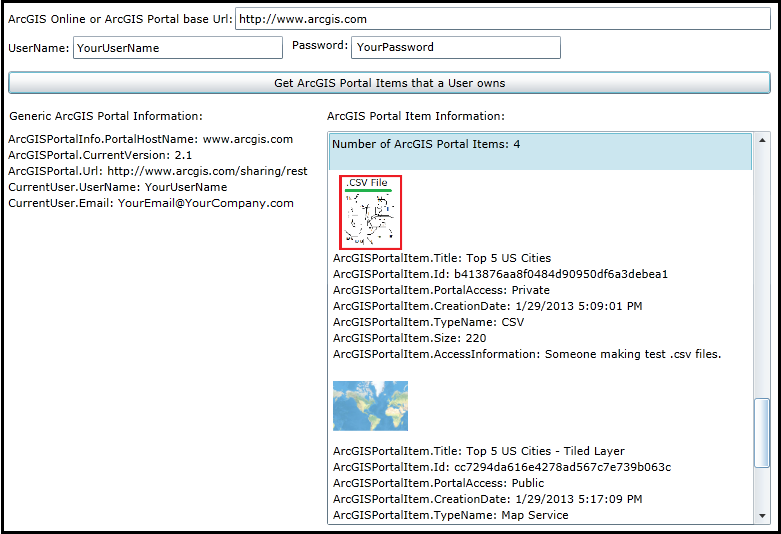
| XAML |  Copy Code Copy Code |
|---|---|
<Grid x:Name="LayoutRoot" Background="White"> <!-- Information the user needs to supply. --> <!-- Get the ArcGIS Online/ArcGIS Portal base Url. --> <sdk:Label Height="28" HorizontalAlignment="Left" Margin="12,83,0,0" Name="Label_ArcGISPortalBaseUrl" VerticalAlignment="Top" Width="231" Content="ArcGIS Online or ArcGIS Portal base Url:"/> <TextBox Height="23" HorizontalAlignment="Left" Margin="239,79,0,0" Name="TextBox_ArcGISPortalBaseUrl" VerticalAlignment="Top" Width="536" /> <!-- Use the IdentityManager with user credentials to access the information for the ArcGISPortalUser. --> <sdk:Label Height="28" HorizontalAlignment="Left" Margin="12,112,0,0" Name="Label_UserName" VerticalAlignment="Top" Width="70" Content="UserName:"/> <TextBox Height="23" HorizontalAlignment="Left" Margin="77,108,0,0" Name="TextBox_UserName" VerticalAlignment="Top" Width="210" /> <sdk:Label Height="28" HorizontalAlignment="Left" Margin="296,109,0,0" Name="Label_Password" VerticalAlignment="Top" Width="56" Content="Password:"/> <TextBox Height="23" HorizontalAlignment="Left" Margin="355,108,0,0" Name="TextBox_Password" VerticalAlignment="Top" Width="210" /> <!-- Button to invoke searching for Users on ArcGIS Online/ArcGIS Portal--> <Button Content="Get ArcGIS Portal Items that a User owns" Height="23" HorizontalAlignment="Left" Margin="12,143,0,0" Name="Button1" VerticalAlignment="Top" Width="763" Click="Button1_Click" /> <!-- Display the results to the user. --> <sdk:Label HorizontalAlignment="Left" Margin="13,180,0,392" Name="Label_GenericInfo" Width="202" Content="Generic ArcGIS Portal Information:" VerticalAlignment="Top"/> <TextBlock Height="385" HorizontalAlignment="Left" Margin="12,203,0,0" Name="TextBlock_GenericInfo" VerticalAlignment="Top" Width="314" /> <sdk:Label Height="28" HorizontalAlignment="Left" Margin="331,180,0,0" Name="Label_ItemInfo" VerticalAlignment="Top" Width="194" Content="ArcGIS Portal Item Information:"/> <ListBox Height="385" HorizontalAlignment="Left" Margin="331,203,0,0" Name="ListBox_ItemInfo" VerticalAlignment="Top" Width="444" /> <!-- Provide the instructions on how to use the sample code. --> <TextBlock Height="73" HorizontalAlignment="Left" Name="TextBlock1" VerticalAlignment="Top" Width="788" TextWrapping="Wrap" Text="Set the correct values for the example code initialization variables in the code-behind (the user needs to provide the ArcGIS Online (AGOL) or ArcGIS Portal base Url and credentials via username/password to access secured services). Once the user information is provided, click the button to make Asynchronous calls to the AGOL/ArcGIS Portal server to retrive information about which Items belong to the logged in User." /> </Grid> | |
| C# | Copy Code |
|---|---|
public MainPage() { InitializeComponent(); // TODO: Provide your default values to run the example code. // ========================================================== // Provide the Url to ArcGIS OnLine (AGOL) or your ArcGIS Portal. TextBox_ArcGISPortalBaseUrl.Text = "http://www.arcgis.com"; // To gain access to secured services on AGOL/Portal provide Username/Password information. TextBox_UserName.Text = "YourUserName"; TextBox_Password.Text = "YourPassword"; } private void Button1_Click(object sender, System.Windows.RoutedEventArgs e) { // This sub-routine executes when the user clicks the Button. The purpose is to get general information about the // AGOL/Portal service (including user information if trying to access a secured service). Additionally, information // about ArcGISPortalItems that belong to the User is returned. // Clear out any existing results before proceeding. TextBlock_GenericInfo.Text = ""; ListBox_ItemInfo.Items.Clear(); // Set the referer string of the IdentityManager using the .TokenGenrationReferer Property. // This will establish the referer string that is part of the Http WebRequest Header. // FYI: You can view the 'Referer' header information in freeware/shareware applications like 'Fiddler'. // NOTE: // For WPF this value could be any string. Ex: "http://www.MyWebSite.com", "http", "h", "Whatever". // For Silverlight this value should point to the .xap file, but any sub-string will do. Ex: "http://localhost:65121/ClientBin/SL-App.xap", // "http", "h". // For Windows Phone this value should point to the application install location on the device, but any sub-string will do. Ex: // "file://Applications/Install/868A84BA-237D-4980-BF51-74E193CECCF1/Install/", "file", "f". ESRI.ArcGIS.Client.IdentityManager.GenerateTokenOptions myGenerateTokenOptions = null; myGenerateTokenOptions = new ESRI.ArcGIS.Client.IdentityManager.GenerateTokenOptions(); myGenerateTokenOptions.Referer = "h"; // Get the base Url for AGOL/Portal. string myArcGISPortalBaseUrl = TextBox_ArcGISPortalBaseUrl.Text; // Get the Username/Password for accessing secured AGOL/Portal services. string myUserName = TextBox_UserName.Text; string myPassword = TextBox_Password.Text; // Use IdentityManager to access secured AGOL/Portal services. This will cause an asynchronous call to the // sub-routine called CALLBACK_IdentityManager_GenerateCredentialAsync. ESRI.ArcGIS.Client.IdentityManager.Current.GenerateCredentialAsync(myArcGISPortalBaseUrl, myUserName, myPassword, CALLBACK_IdentityManager_GenerateCredentialAsync, myGenerateTokenOptions); } private void CALLBACK_IdentityManager_GenerateCredentialAsync(ESRI.ArcGIS.Client.IdentityManager.Credential myCredential, System.Exception ex) { // This sub-routine executes as a result of the IdentityManager.GenerateCredentialAsync Method. // Ensure there was not a problem in the returned results. if (ex == null) { // Create a new instance of the ArcGISPortal Class. ESRI.ArcGIS.Client.Portal.ArcGISPortal myArcGISPortal = new ESRI.ArcGIS.Client.Portal.ArcGISPortal(); // Set the ArcGISPortal.Token Property to the IdentityManager.Credential long term token. Long term tokens are // necessary to access secured AGOL/Portal services. myArcGISPortal.Token = myCredential.Token; // Get the base Url of the AGOL/portal site. string myArcGISPortalBaseUrl = TextBox_ArcGISPortalBaseUrl.Text; // Add the other necessary parts to the base Url string so that information can be accessed on AGOL/Portal. string myArcGISPortalEnhancedUrl = myArcGISPortalBaseUrl + "/sharing/rest"; // Make an asynchronous call to obtain information from AGOL/Portal. Upon successful completion of this call // you can then gain access to deeper levels of information using other ArcGISPortal asynchronous calls like: // .SearchGroupsAsync, .SearchItemsAsnyc, and .SearchUsersAsync. Additionally, you could also get Property // information from the returned ArcGISPortal object for things like: .ArcGISPortalInfo and .CurrentUser // which is a gateway to getting lots of other detailed information on AGOL/Portal. myArcGISPortal.InitializeAsync(myArcGISPortalEnhancedUrl, CALLBACK_Portal_InitializeAsync); } else { // There was some problem with the IdentityManager.GenerateCredentialAsync call. Display the message to the user. MessageBox.Show("Could not log in. Please check credentials."); } } private void CALLBACK_Portal_InitializeAsync(ESRI.ArcGIS.Client.Portal.ArcGISPortal myArcGISPortal, System.Exception ex) { // This sub-routine executes as a result of the ArcGISPortal.InitializeAsync Method. // Ensure there was not a problem in the returned results. if (ex == null) { // Get the ArcGISPortalInfo object from ArcGISPortal. ESRI.ArcGIS.Client.Portal.ArcGISPortalInfo myArcGISPortalInfo = myArcGISPortal.ArcGISPortalInfo; // Get the ArcGISPortalInfo.PortalHostname information. string myPortalHostName = ""; if (myArcGISPortalInfo != null) { myPortalHostName = myArcGISPortalInfo.PortalHostname; } // Get the ArcGISPortal.CurrentUser object. Initialize some string variables for the username and email of the // CurrentUser. ESRI.ArcGIS.Client.Portal.ArcGISPortalUser myCurrentUser = myArcGISPortal.CurrentUser; string myUserName = myCurrentUser.UserName; string myEmail = myCurrentUser.Email; // Get the CurrentVerion of the AGOL/Portal server. string myCurrentVersion = myArcGISPortal.CurrentVersion; // Get the Url of the AGOL/Portal server. string myUrl = myArcGISPortal.Url; // Create a StringBuilder class to hold information obtained from the AGOL/Portal service. System.Text.StringBuilder myStringBuilder = new System.Text.StringBuilder(); myStringBuilder.Append("ArcGISPortalInfo.PortalHostName: " + myPortalHostName + Environment.NewLine); myStringBuilder.Append("ArcGISPortal.CurrentVersion: " + myCurrentVersion + Environment.NewLine); myStringBuilder.Append("ArcGISPortal.Url: " + myUrl + Environment.NewLine); myStringBuilder.Append("CurrentUser.UserName: " + myUserName + Environment.NewLine); myStringBuilder.Append("CurrentUser.Email: " + myEmail + Environment.NewLine); // Display the information about the AGOL/Portal server to the user. TextBlock_GenericInfo.Text = myStringBuilder.ToString(); //---------------------------------------------------------------- // Now that the ArcGISPortal.InitializeAsync has successfully been invoked, we can now get more detailed information // about which Items belong to the logged in User (i.e. ArcGISPortal.CurrentUser). myCurrentUser.GetItemsAsync(CALLBACK_ArcGISPortalUser_GetItemsAsync); } else { // There was some problem with the ArcGISPortal.InitializeAsync call. Display the message to the user. MessageBox.Show("Failed to initialize" + ex.Message.ToString()); } } private void CALLBACK_ArcGISPortalUser_GetItemsAsync(IEnumerable<ESRI.ArcGIS.Client.Portal.ArcGISPortalItem> IEnumberableOfArcGISPortalItem, System.Exception ex) { // This sub-routine executes as a result of the ArcGISPortalUser.GetItemsAsync Method. // Ensure there was not a problem in the returned results. if (ex == null) { // Only the valid user found via the IdentityManager will have results. Users that cannot be found via IdentityManager // will come back as Nothing/null and you will need to handle accordingly. if (IEnumberableOfArcGISPortalItem != null) { // Create a StringBuilder class to hold User information obtained from the AGOL/Portal service. Display the // number of Items found in the ListBox. System.Text.StringBuilder myStringBuilder = new System.Text.StringBuilder(); myStringBuilder.Append("Number of ArcGIS Portal Items: " + IEnumberableOfArcGISPortalItem.Count() + Environment.NewLine); ListBox_ItemInfo.Items.Add(myStringBuilder.ToString()); // Loop through each ArcGISPortalItem object. foreach (ESRI.ArcGIS.Client.Portal.ArcGISPortalItem oneArcGISPortalItem in IEnumberableOfArcGISPortalItem) { // Get various ArcGISPortalItem Property information; like: the image for the Item, the Title of the Item, // the long GUID type of Id for the Item, the access level (ex: Private, Public, Organizaton, etc.) of the Item, // the date the Item was created, the type of Item it is (ex: shapefile, webmap, .csv file, etc.), the byte size // on disk of the Item, the user access restrictions infomation of the Item, etc. Uri myThumbnailUri = oneArcGISPortalItem.ThumbnailUri; ESRI.ArcGIS.Client.Portal.PortalAccess myPortalAccess = oneArcGISPortalItem.Access; string myTitle = oneArcGISPortalItem.Title; string myId = oneArcGISPortalItem.Id; DateTime myCreationDate = oneArcGISPortalItem.CreationDate; string myTypeName = oneArcGISPortalItem.TypeName; int mySize = oneArcGISPortalItem.Size; string myAccessInformation = oneArcGISPortalItem.AccessInformation; // Create a new StackPanel to house the information that will be displayed to the user about each Item found. StackPanel myStackPanel = new StackPanel(); myStackPanel.Orientation = Orientation.Vertical; if (myThumbnailUri != null) { // If the Item has an image, display it. // Create a new Image object, define its size and set the Uri of the Image to that for the Item. Image myImage = new Image(); myImage.Width = 75; myImage.Height = 75; myImage.Source = new System.Windows.Media.Imaging.BitmapImage(myThumbnailUri); // Silverlight has issues with .gif format images! // Display the image on the left in the ListBox. StackPanel myStackPanel2 = new StackPanel(); myStackPanel2.Orientation = Orientation.Horizontal; myStackPanel2.HorizontalAlignment =System.Windows.HorizontalAlignment.Left; myStackPanel2.Children.Add(myImage); myStackPanel.Children.Add(myStackPanel2); } else { // The Item does not have an image logo defined. // Inform the application user that no Item image is availble for display. TextBlock myTextBlock_ArcGISPortalUser_ThumbnailImage = new TextBlock(); myTextBlock_ArcGISPortalUser_ThumbnailImage.Text = "[NO THUMBNAIL IMAGE AVAILABLE]"; myStackPanel.Children.Add(myTextBlock_ArcGISPortalUser_ThumbnailImage); } // Display the title of the Item. TextBlock myTextBlock_ArcGISPortalItem_Title = new TextBlock(); myTextBlock_ArcGISPortalItem_Title.Text = "ArcGISPortalItem.Title: " + myTitle; myStackPanel.Children.Add(myTextBlock_ArcGISPortalItem_Title); // Display the long GUID type of Id for the Item. TextBlock myTextBlock_ArcGISPortalItem_Id = new TextBlock(); myTextBlock_ArcGISPortalItem_Id.Text = "ArcGISPortalItem.Id: " + myId; myStackPanel.Children.Add(myTextBlock_ArcGISPortalItem_Id); // Display the access level for the Item (ex: Private, Public, Organization, etc.). TextBlock myTextBlock_ArcGISPortalItem_PortalAccess = new TextBlock(); myTextBlock_ArcGISPortalItem_PortalAccess.Text = "ArcGISPortalItem.PortalAccess: " + myPortalAccess.ToString(); myStackPanel.Children.Add(myTextBlock_ArcGISPortalItem_PortalAccess); // Display the date the Item was created. TextBlock myTextBlock_ArcGISPortalItem_CreationDate = new TextBlock(); myTextBlock_ArcGISPortalItem_CreationDate.Text = "ArcGISPortalItem.CreationDate: " + myCreationDate.ToString(); myStackPanel.Children.Add(myTextBlock_ArcGISPortalItem_CreationDate); // Display the type of Item it is (ex: shapefile, webmap, .csv file, etc.). TextBlock myTextBlock_ArcGISPortalItem_TypeName = new TextBlock(); myTextBlock_ArcGISPortalItem_TypeName.Text = "ArcGISPortalItem.TypeName: " + myTypeName; myStackPanel.Children.Add(myTextBlock_ArcGISPortalItem_TypeName); // Display the byte size on disk of the Item. TextBlock myTextBlock_ArcGISPortalItem_Size = new TextBlock(); myTextBlock_ArcGISPortalItem_Size.Text = "ArcGISPortalItem.Size: " + mySize; myStackPanel.Children.Add(myTextBlock_ArcGISPortalItem_Size); // Display the user access restrictions infomation of the Item. TextBlock myTextBlock_ArcGISPortalItem_AccessInformation = new TextBlock(); myTextBlock_ArcGISPortalItem_AccessInformation.Text = "ArcGISPortalItem.AccessInformation: " + myAccessInformation; myStackPanel.Children.Add(myTextBlock_ArcGISPortalItem_AccessInformation); // Add the various display objects about the User in the ListBox. ListBox_ItemInfo.Items.Add(myStackPanel); } } } else { // There was some problem with the ArcGISPortalUser.GetItemsAsync call. Display the message to the user. MessageBox.Show("Failed to initialize" + ex.Message.ToString()); } } | |
| VB.NET | Copy Code |
|---|---|
Public Sub New() InitializeComponent() ' TODO: Provide your default values to run the example code. ' ========================================================== ' Provide the Url to ArcGIS OnLine (AGOL) or your ArcGIS Portal. TextBox_ArcGISPortalBaseUrl.Text = "http://www.arcgis.com" ' To gain access to secured services on AGOL/Portal provide Username/Password information. TextBox_UserName.Text = "YourUserName" TextBox_Password.Text = "YourPassword" End Sub Private Sub Button1_Click(sender As System.Object, e As System.Windows.RoutedEventArgs) ' This sub-routine executes when the user clicks the Button. The purpose is to get general information about the ' AGOL/Portal service (including user information if trying to access a secured service). Additionally, information ' about ArcGISPortalItems that belong to the User is returned. ' Clear out any existing results before proceeding. TextBlock_GenericInfo.Text = "" ListBox_ItemInfo.Items.Clear() ' Set the referer string of the IdentityManager using the .TokenGenrationReferer Property. ' This will establish the referer string that is part of the Http WebRequest Header. ' FYI: You can view the 'Referer' header information in freeware/shareware applications like 'Fiddler'. ' NOTE: ' For WPF this value could be any string. Ex: "http://www.MyWebSite.com", "http", "h", "Whatever". ' For Silverlight this value should point to the .xap file, but any sub-string will do. Ex: "http://localhost:65121/ClientBin/SL-App.xap", ' "http", "h". ' For Windows Phone this value should point to the application install location on the device, but any sub-string will do. Ex: ' "file://Applications/Install/868A84BA-237D-4980-BF51-74E193CECCF1/Install/", "file", "f". Dim myGenerateTokenOptions As ESRI.ArcGIS.Client.IdentityManager.GenerateTokenOptions myGenerateTokenOptions = New ESRI.ArcGIS.Client.IdentityManager.GenerateTokenOptions myGenerateTokenOptions.Referer = "h" ' Get the base Url for AGOL/Portal. Dim myArcGISPortalBaseUrl As String = TextBox_ArcGISPortalBaseUrl.Text ' Get the Username/Password for accessing secured AGOL/Portal services. Dim myUserName As String = TextBox_UserName.Text Dim myPassword As String = TextBox_Password.Text ' Use IdentityManager to access secured AGOL/Portal services. This will cause an asynchronous call to the ' sub-routine called CALLBACK_IdentityManager_GenerateCredentialAsync. ESRI.ArcGIS.Client.IdentityManager.Current.GenerateCredentialAsync(myArcGISPortalBaseUrl, myUserName, myPassword, AddressOf CALLBACK_IdentityManager_GenerateCredentialAsync, myGenerateTokenOptions) End Sub Private Sub CALLBACK_IdentityManager_GenerateCredentialAsync(myCredential As ESRI.ArcGIS.Client.IdentityManager.Credential, ex As System.Exception) ' This sub-routine executes as a result of the IdentityManager.GenerateCredentialAsync Method. ' Ensure there was not a problem in the returned results. If ex Is Nothing Then ' Create a new instance of the ArcGISPortal Class. Dim myArcGISPortal As ESRI.ArcGIS.Client.Portal.ArcGISPortal = New ESRI.ArcGIS.Client.Portal.ArcGISPortal ' Set the ArcGISPortal.Token Property to the IdentityManager.Credential long term token. Long term tokens are ' necessary to access secured AGOL/Portal services. myArcGISPortal.Token = myCredential.Token ' Get the base Url of the AGOL/portal site. Dim myArcGISPortalBaseUrl As String = TextBox_ArcGISPortalBaseUrl.Text ' Add the other necessary parts to the base Url string so that information can be accessed on AGOL/Portal. Dim myArcGISPortalEnhancedUrl As String = myArcGISPortalBaseUrl + "/sharing/rest" ' Make an asynchronous call to obtain information from AGOL/Portal. Upon successful completion of this call ' you can then gain access to deeper levels of information using other ArcGISPortal asynchronous calls like: ' .SearchGroupsAsync, .SearchItemsAsnyc, and .SearchUsersAsync. Additionally, you could also get Property ' information from the returned ArcGISPortal object for things like: .ArcGISPortalInfo and .CurrentUser ' which is a gateway to getting lots of other detailed information on AGOL/Portal. myArcGISPortal.InitializeAsync(myArcGISPortalEnhancedUrl, AddressOf CALLBACK_Portal_InitializeAsync) Else ' There was some problem with the IdentityManager.GenerateCredentialAsync call. Display the message to the user. MessageBox.Show("Could not log in. Please check credentials.") End If End Sub Private Sub CALLBACK_Portal_InitializeAsync(myArcGISPortal As ESRI.ArcGIS.Client.Portal.ArcGISPortal, ex As System.Exception) ' This sub-routine executes as a result of the ArcGISPortal.InitializeAsync Method. ' Ensure there was not a problem in the returned results. If ex Is Nothing Then ' Get the ArcGISPortalInfo object from ArcGISPortal. Dim myArcGISPortalInfo As ESRI.ArcGIS.Client.Portal.ArcGISPortalInfo = myArcGISPortal.ArcGISPortalInfo ' Get the ArcGISPortalInfo.PortalHostname information. Dim myPortalHostName As String = "" If myArcGISPortalInfo IsNot Nothing Then myPortalHostName = myArcGISPortalInfo.PortalHostname End If ' Get the ArcGISPortal.CurrentUser object. Initialize some string variables for the username and email of the ' CurrentUser. Dim myCurrentUser As ESRI.ArcGIS.Client.Portal.ArcGISPortalUser = myArcGISPortal.CurrentUser Dim myUserName As String = myCurrentUser.UserName Dim myEmail As String = myCurrentUser.Email ' Get the CurrentVerion of the AGOL/Portal server. Dim myCurrentVersion As String = myArcGISPortal.CurrentVersion ' Get the Url of the AGOL/Portal server. Dim myUrl As String = myArcGISPortal.Url ' Create a StringBuilder class to hold information obtained from the AGOL/Portal service. Dim myStringBuilder As New Text.StringBuilder myStringBuilder.Append("ArcGISPortalInfo.PortalHostName: " + myPortalHostName + vbCrLf) myStringBuilder.Append("ArcGISPortal.CurrentVersion: " + myCurrentVersion + vbCrLf) myStringBuilder.Append("ArcGISPortal.Url: " + myUrl + vbCrLf) myStringBuilder.Append("CurrentUser.UserName: " + myUserName + vbCrLf) myStringBuilder.Append("CurrentUser.Email: " + myEmail + vbCrLf) ' Display the information about the AGOL/Portal server to the user. TextBlock_GenericInfo.Text = myStringBuilder.ToString '---------------------------------------------------------------- ' Now that the ArcGISPortal.InitializeAsync has successfully been invoked, we can now get more detailed information ' about which Items belong to the logged in User (i.e. ArcGISPortal.CurrentUser). myCurrentUser.GetItemsAsync(AddressOf CALLBACK_ArcGISPortalUser_GetItemsAsync) Else ' There was some problem with the ArcGISPortal.InitializeAsync call. Display the message to the user. MessageBox.Show("Failed to initialize" & ex.Message.ToString()) End If End Sub Private Sub CALLBACK_ArcGISPortalUser_GetItemsAsync(IEnumberableOfArcGISPortalItem As IEnumerable(Of ESRI.ArcGIS.Client.Portal.ArcGISPortalItem), ex As System.Exception) ' This sub-routine executes as a result of the ArcGISPortalUser.GetItemsAsync Method. ' Ensure there was not a problem in the returned results. If ex Is Nothing Then ' Only the valid user found via the IdentityManager will have results. Users that cannot be found via IdentityManager ' will come back as Nothing/null and you will need to handle accordingly. If IEnumberableOfArcGISPortalItem IsNot Nothing Then ' Create a StringBuilder class to hold User information obtained from the AGOL/Portal service. Display the ' number of Items found in the ListBox. Dim myStringBuilder As New Text.StringBuilder myStringBuilder.Append("Number of ArcGIS Portal Items: " + IEnumberableOfArcGISPortalItem.Count.ToString + vbCrLf) ListBox_ItemInfo.Items.Add(myStringBuilder.ToString) ' Loop through each ArcGISPortalItem object. For Each oneArcGISPortalItem As ESRI.ArcGIS.Client.Portal.ArcGISPortalItem In IEnumberableOfArcGISPortalItem ' Get various ArcGISPortalItem Property information; like: the image for the Item, the Title of the Item, ' the long GUID type of Id for the Item, the access level (ex: Private, Public, Organizaton, etc.) of the Item, ' the date the Item was created, the type of Item it is (ex: shapefile, webmap, .csv file, etc.), the byte size ' on disk of the Item, the user access restrictions infomation of the Item, etc. Dim myThumbnailUri As Uri = oneArcGISPortalItem.ThumbnailUri Dim myPortalAccess As ESRI.ArcGIS.Client.Portal.PortalAccess = oneArcGISPortalItem.Access Dim myTitle As String = oneArcGISPortalItem.Title Dim myId As String = oneArcGISPortalItem.Id Dim myCreationDate As Date = oneArcGISPortalItem.CreationDate Dim myTypeName As String = oneArcGISPortalItem.TypeName Dim mySize As Integer = oneArcGISPortalItem.Size Dim myAccessInformation As String = oneArcGISPortalItem.AccessInformation ' Create a new StackPanel to house the information that will be displayed to the user about each Item found. Dim myStackPanel As New StackPanel myStackPanel.Orientation = Orientation.Vertical If myThumbnailUri IsNot Nothing Then ' If the Item has an image, display it. ' Create a new Image object, define its size and set the Uri of the Image to that for the Item. Dim myImage As New Image myImage.Width = 75 myImage.Height = 75 myImage.Source = New Imaging.BitmapImage(myThumbnailUri) ' Silverlight has issues with .gif format images! ' Display the image on the left in the ListBox. Dim myStackPanel2 As New StackPanel myStackPanel2.Orientation = Orientation.Horizontal myStackPanel2.HorizontalAlignment = Windows.HorizontalAlignment.Left myStackPanel2.Children.Add(myImage) myStackPanel.Children.Add(myStackPanel2) Else ' The Item does not have an image logo defined. ' Inform the application user that no Item image is availble for display. Dim myTextBlock_ArcGISPortalUser_ThumbnailImage As New TextBlock myTextBlock_ArcGISPortalUser_ThumbnailImage.Text = "[NO THUMBNAIL IMAGE AVAILABLE]" myStackPanel.Children.Add(myTextBlock_ArcGISPortalUser_ThumbnailImage) End If ' Display the title of the Item. Dim myTextBlock_ArcGISPortalItem_Title As New TextBlock myTextBlock_ArcGISPortalItem_Title.Text = "ArcGISPortalItem.Title: " + myTitle myStackPanel.Children.Add(myTextBlock_ArcGISPortalItem_Title) ' Display the long GUID type of Id for the Item. Dim myTextBlock_ArcGISPortalItem_Id As New TextBlock myTextBlock_ArcGISPortalItem_Id.Text = "ArcGISPortalItem.Id: " + myId myStackPanel.Children.Add(myTextBlock_ArcGISPortalItem_Id) ' Display the access level for the Item (ex: Private, Public, Organization, etc.). Dim myTextBlock_ArcGISPortalItem_PortalAccess As New TextBlock myTextBlock_ArcGISPortalItem_PortalAccess.Text = "ArcGISPortalItem.PortalAccess: " + myPortalAccess.ToString myStackPanel.Children.Add(myTextBlock_ArcGISPortalItem_PortalAccess) ' Display the date the Item was created. Dim myTextBlock_ArcGISPortalItem_CreationDate As New TextBlock myTextBlock_ArcGISPortalItem_CreationDate.Text = "ArcGISPortalItem.CreationDate: " + myCreationDate.ToString myStackPanel.Children.Add(myTextBlock_ArcGISPortalItem_CreationDate) ' Display the type of Item it is (ex: shapefile, webmap, .csv file, etc.). Dim myTextBlock_ArcGISPortalItem_TypeName As New TextBlock myTextBlock_ArcGISPortalItem_TypeName.Text = "ArcGISPortalItem.TypeName: " + myTypeName myStackPanel.Children.Add(myTextBlock_ArcGISPortalItem_TypeName) ' Display the byte size on disk of the Item. Dim myTextBlock_ArcGISPortalItem_Size As New TextBlock myTextBlock_ArcGISPortalItem_Size.Text = "ArcGISPortalItem.Size: " + mySize.ToString myStackPanel.Children.Add(myTextBlock_ArcGISPortalItem_Size) ' Display the user access restrictions infomation of the Item. Dim myTextBlock_ArcGISPortalItem_AccessInformation As New TextBlock myTextBlock_ArcGISPortalItem_AccessInformation.Text = "ArcGISPortalItem.AccessInformation: " + myAccessInformation myStackPanel.Children.Add(myTextBlock_ArcGISPortalItem_AccessInformation) ' Add the various display objects about the User in the ListBox. ListBox_ItemInfo.Items.Add(myStackPanel) Next End If Else ' There was some problem with the ArcGISPortalUser.GetItemsAsync call. Display the message to the user. MessageBox.Show("Failed to initialize" & ex.Message.ToString()) End If End Sub | |
Requirements
Target Platforms: Windows XP Professional, Windows Server 2003 family, Windows Vista, Windows Server 2008 family, Windows 7, Windows 8