


 Syntax
| Visual Basic (Declaration) | |
|---|---|
Public Sub InitializeAsync( _ ByVal id As String, _ ByVal callback As Action(Of ArcGISPortalGroup,Exception) _ ) | |
| C# | |
|---|---|
public void InitializeAsync( string id, Action<ArcGISPortalGroup,Exception> callback ) | |
Remarks
This Method initializes a single Portal.ArcGISPortalGroup. Portal.ArcGISPortalGroup objects are collections (aka. groups) of items, usually related to a specific area of interest such as maps (aka. WebMap), applications, and tools. Groups allow members to contribute items as a useful way to collaborate. This Method finds a specific group within ArcGIS Online (AGOL) or ArcGIS Portal by providing the Id value.
You do not have to be a logged in user using the IdentityManager to get information from this Method. You can gain this information from anonymous access. However, to obtain information about an group that has a Portal.PortalAccess level of Private or Shared you need to use the IdentityManager by supplying the appropriate username/password credentials. As AGOL and ArcGIS Portal require the use of long term tokens to access secured information (i.e. information that is Private/Shared), you should remember to set the IdentityManager.TokenGenerationReferer Property to the correct string required by your development platform.
Parameters
- id
- The group id.
- callback
- The callback executed when the result is available.
Example
How to use:
Set the correct values for the example code initialization variables in the code-behind (the user needs to provide the ArcGIS Online (AGOL) or ArcGIS Portal base Url, credentials via username/password if wanting to access secured services, and the Id value of an ArcGISPortalGroup). Once the user information is provided, click the button to make Asynchronous calls to the AGOL/ArcGIS Portal server to retrieve information for a specific ArcGISPortalGroup.
The XAML code in this example is used in conjunction with the code-behind (C# or VB.NET) to demonstrate the functionality.
The following screen shot corresponds to the code example in this page.
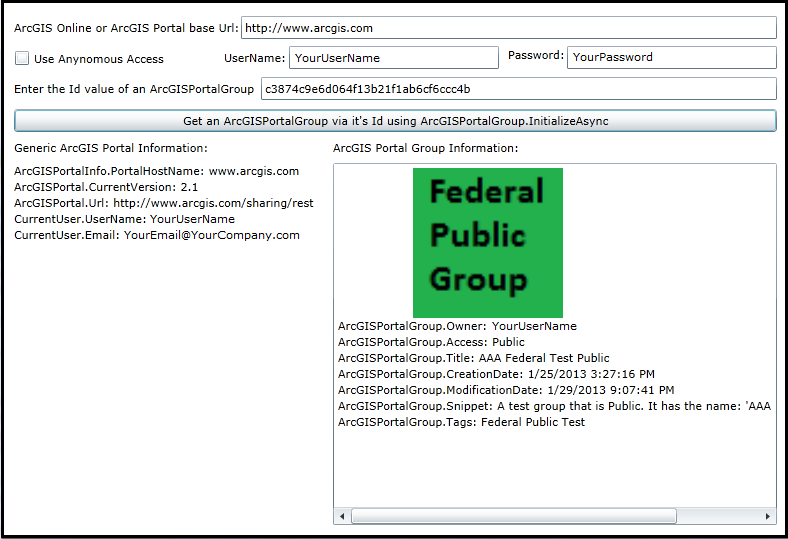
| XAML |  Copy Code Copy Code |
|---|---|
<Grid x:Name="LayoutRoot" Background="White"> <!-- Information the user needs to supply. --> <!-- Get the ArcGIS Online/ArcGIS Portal base Url. --> <sdk:Label Height="28" HorizontalAlignment="Left" Margin="12,83,0,0" Name="Label_ArcGISPortalBaseUrl" VerticalAlignment="Top" Width="231" Content="ArcGIS Online or ArcGIS Portal base Url:"/> <TextBox Height="23" HorizontalAlignment="Left" Margin="239,79,0,0" Name="TextBox_ArcGISPortalBaseUrl" VerticalAlignment="Top" Width="536" /> <!-- Use Anonymous access or IdentityManager with user credentials to access the information about ArcGISPortalGroups. --> <CheckBox Content="Use Anynomous Access" Height="16" Margin="12,113,0,0" Name="CheckBox_UseAnonymousAccess" VerticalAlignment="Top" HorizontalAlignment="Left" Width="165" Click="CheckBox_UseAnonymousAccess_Click" /> <sdk:Label Height="28" HorizontalAlignment="Left" Margin="222,113,0,0" Name="Label_UserName" VerticalAlignment="Top" Width="70" Content="UserName:"/> <TextBox Height="23" HorizontalAlignment="Left" Margin="287,109,0,0" Name="TextBox_UserName" VerticalAlignment="Top" Width="210" /> <sdk:Label Height="28" HorizontalAlignment="Left" Margin="506,110,0,0" Name="Label_Password" VerticalAlignment="Top" Width="56" Content="Password:"/> <TextBox Height="23" HorizontalAlignment="Left" Margin="565,109,0,0" Name="TextBox_Password" VerticalAlignment="Top" Width="210" /> <sdk:Label Height="28" HorizontalAlignment="Left" Margin="12,144,0,0" Name="Label_SearchGroupId" VerticalAlignment="Top" Width="241" Content="Enter the Id value of an ArcGISPortalGroup:"/> <TextBox Height="23" HorizontalAlignment="Left" Margin="259,140,0,0" Name="TextBox_SearchGroupId" VerticalAlignment="Top" Width="516" /> <!-- Button to invoke searching for Groups on ArcGIS Online/ArcGIS Portal--> <Button Content="Get an ArcGISPortalGroup via it's Id using ArcGISPortalGroup.InitializeAsync" Height="23" HorizontalAlignment="Left" Margin="12,172,0,0" Name="Button1" VerticalAlignment="Top" Width="763" Click="Button1_Click" /> <!-- Display the results to the user. --> <sdk:Label Height="28" HorizontalAlignment="Left" Margin="12,203,0,0" Name="Label_GenericInfo" VerticalAlignment="Top" Width="202" Content="Generic ArcGIS Portal Information:"/> <TextBlock Height="362" HorizontalAlignment="Left" Margin="12,226,0,0" Name="TextBlock_GenericInfo" VerticalAlignment="Top" Width="314" /> <sdk:Label Height="28" HorizontalAlignment="Left" Margin="331,203,0,0" Name="Label_GroupInfo" VerticalAlignment="Top" Width="194" Content="ArcGIS Portal Group Information:"/> <ListBox Height="362" HorizontalAlignment="Left" Margin="331,226,0,0" Name="ListBox_GroupInfo" VerticalAlignment="Top" Width="444" /> <!-- Provide the instructions on how to use the sample code. --> <TextBlock Height="73" HorizontalAlignment="Left" Name="TextBlock1" VerticalAlignment="Top" Width="788" TextWrapping="Wrap" Text="Set the correct values for the example code initialization variables in the code-behind (the user needs to provide the ArcGIS Online (AGOL) or ArcGIS Portal base Url, credentials via username/password if wanting to access secured services, and the Id value of an ArcGISPortalGroup). Once the user information is provided, click the button to make Asynchronous calls to the AGOL/ArcGIS Portal server to retrieve information for a specific ArcGISPortalGroup." /> </Grid> | |
| C# | Copy Code |
|---|---|
public MainPage() { InitializeComponent(); // TODO: Provide your default values to run the example code. // ========================================================== // Provide the Url to ArcGIS OnLine (AGOL) or your ArcGIS Portal. TextBox_ArcGISPortalBaseUrl.Text = "http://www.arcgis.com"; // If gaining access to secured services on AGOL/Portal provide Username/Password information. TextBox_UserName.Text = "YourUserName"; TextBox_Password.Text = "YourPassword"; // Provide the default Id value of an ArcGISPortalGroup in AGOL/Portal. TextBox_SearchGroupId.Text = "c3874c9e6d064f13b21f1ab6cf6ccc4b"; } private void Button1_Click(object sender, System.Windows.RoutedEventArgs e) { // This sub-routine executes when the user clicks the Button. The purpose is to get general information about the // AGOL/Portal service (including user information if trying to access a secured service). Additionally, information // about an ArcGISPortalGroup is returned based upon it's Id value. // Clear out any existing results before proceeding. TextBlock_GenericInfo.Text = ""; ListBox_GroupInfo.Items.Clear(); // Set the referer string of the IdentityManager using the .TokenGenrationReferer Property. // This will establish the referer string that is part of the Http WebRequest Header. // FYI: You can view the 'Referer' header information in freeware/shareware applications like 'Fiddler'. // NOTE: // For WPF this value could be any string. // Ex: "http://www.MyWebSite.com", "http", "h", "Whatever". // For Silverlight this value should point to the .xap file, but any sub-string will do. // Ex: "http://localhost:65121/ClientBin/SL-App.xap", "http", "h". // For Windows Phone this value should point to the application install location on the device, but any sub-string will do. // Ex: "file://Applications/Install/868A84BA-237D-4980-BF51-74E193CECCF1/Install/", "file", "f". ESRI.ArcGIS.Client.IdentityManager.GenerateTokenOptions myGenerateTokenOptions = null; myGenerateTokenOptions = new ESRI.ArcGIS.Client.IdentityManager.GenerateTokenOptions(); myGenerateTokenOptions.Referer = "h"; // Get the base Url for AGOL/Portal. string myArcGISPortalBaseUrl = TextBox_ArcGISPortalBaseUrl.Text; // Get the Username/Password for accessing secured AGOL/Portal services. string myUserName = TextBox_UserName.Text; string myPassword = TextBox_Password.Text; // Use IdentityManager to access secured AGOL/Portal services. This will cause an asynchronous call to the // sub-routine called CALLBACK_IdentityManager_GenerateCredentialAsync. ESRI.ArcGIS.Client.IdentityManager.Current.GenerateCredentialAsync(myArcGISPortalBaseUrl, myUserName, myPassword, CALLBACK_IdentityManager_GenerateCredentialAsync, myGenerateTokenOptions); } private void CALLBACK_IdentityManager_GenerateCredentialAsync(ESRI.ArcGIS.Client.IdentityManager.Credential myCredential, System.Exception ex) { // This sub-routine executes as a result of the IdentityManager.GenerateCredentialAsync Method. // Ensure there was not a problem in the returned results. if (ex == null) { // Create a new instance of the ArcGISPortal Class. ESRI.ArcGIS.Client.Portal.ArcGISPortal myArcGISPortal = new ESRI.ArcGIS.Client.Portal.ArcGISPortal(); // Determine if we are going to really use the IdentityManager result to get information from AGOL/Portal. if (CheckBox_UseAnonymousAccess.IsChecked == false) { // The user wants to use their username/password to access secured AGOL/Portal services. Using this option will // display Private Groups to which the logged in user is part of or is the administrator of. // Set the ArcGISPortal.Token Property to the IdentityManager.Credential long term token. // Long term tokens are necessary to access secured AGOL/Portal services. myArcGISPortal.Token = myCredential.Token; } else { // The user wants to access publically available information from AGOL/Portal services. Private Groups will not // be displayed using this option. // The need to use the ArcGISPortal.Token is NOT necessary. } // Get the base Url of the AGOL/portal site. string myArcGISPortalBaseUrl = TextBox_ArcGISPortalBaseUrl.Text; // Add the other necessary parts to the base Url string so that information can be accessed on AGOL/Portal. string myArcGISPortalEnhancedUrl = myArcGISPortalBaseUrl + "/sharing/rest"; // Make an asynchronous call to obtain information from AGOL/Portal. Upon successful completion of this call // you can then gain access to deeper levels of information using other ArcGISPortal asynchronous calls like: // .SearchGroupsAsync, .SearchItemsAsnyc, and .SearchUsersAsync. myArcGISPortal.InitializeAsync(myArcGISPortalEnhancedUrl, CALLBACK_Portal_InitializeAsync); } else { // There was some problem with the IdentityManager.GenerateCredentialAsync call. Display the message to the user. MessageBox.Show("Could not log in. Please check credentials."); } } private void CALLBACK_Portal_InitializeAsync(ESRI.ArcGIS.Client.Portal.ArcGISPortal myArcGISPortal, System.Exception ex) { // This sub-routine executes as a result of the ArcGISPortal.InitializeAsync Method. // Ensure there was not a problem in the returned results. if (ex == null) { // Get the ArcGISPortalInfo object from ArcGISPortal. ESRI.ArcGIS.Client.Portal.ArcGISPortalInfo myArcGISPortalInfo = myArcGISPortal.ArcGISPortalInfo; // Get the ArcGISPortalInfo.PortalHostname information. string myPortalHostName = ""; if (myArcGISPortalInfo != null) { myPortalHostName = myArcGISPortalInfo.PortalHostname; } // Get the ArcGISPortal.CurrentUser object. Initialize some string variables for the username and email of the // CurrentUser. If we have a valid CurrentUser get that information. If the user tries to get information using // anonymous access the default string values of "[NOT AVAILABLE]" are provided. ESRI.ArcGIS.Client.Portal.ArcGISPortalUser myCurrentUser = myArcGISPortal.CurrentUser; string myUserName = "[NOT AVAILABLE]"; string myEmail = "[NOT AVAILABLE]"; if (myCurrentUser != null) { myUserName = myCurrentUser.UserName; myEmail = myCurrentUser.Email; } // Get the CurrentVerion of the AGOL/Portal server. string myCurrentVersion = myArcGISPortal.CurrentVersion; // Get the Url of the AGOL/Portal server. string myUrl = myArcGISPortal.Url; // Create a StringBuilder class to hold information obtained from the AGOL/Portal service. System.Text.StringBuilder myStringBuilder = new System.Text.StringBuilder(); myStringBuilder.Append("ArcGISPortalInfo.PortalHostName: " + myPortalHostName + Environment.NewLine); myStringBuilder.Append("ArcGISPortal.CurrentVersion: " + myCurrentVersion + Environment.NewLine); myStringBuilder.Append("ArcGISPortal.Url: " + myUrl + Environment.NewLine); myStringBuilder.Append("CurrentUser.UserName: " + myUserName + Environment.NewLine); myStringBuilder.Append("CurrentUser.Email: " + myEmail + Environment.NewLine); // Display the information about the AGOL/Portal server to the user. TextBlock_GenericInfo.Text = myStringBuilder.ToString(); //---------------------------------------------------------------- // Now that the ArcGISPortal.InitializeAsync has successfully been invoked, we can now get more detailed information // about a specific ArcGISPortalGroup. // Create a new SearchParameters object. ESRI.ArcGIS.Client.Portal.SearchParameters mySearchParameters = new ESRI.ArcGIS.Client.Portal.SearchParameters(); // Get the Id value for the ArcGISPortal Group. string myArcGISPortalGroupId = TextBox_SearchGroupId.Text; // Add the search Id of the ArcGISPortalGroup to the SearchParameters. mySearchParameters.QueryString = myArcGISPortalGroupId; // Create a new ArcGISPortalGroup using the ArcGISPortal object in the constructor. ESRI.ArcGIS.Client.Portal.ArcGISPortalGroup myArcGISPortalGroup = new ESRI.ArcGIS.Client.Portal.ArcGISPortalGroup(myArcGISPortal); // Use the ArcGISPortalGroup object to access Group information in AGOL/Portal services. This will cause an asynchronous call to the // sub-routine called CALLBACK_ArcGISPortalGroup_InitializeAsync. myArcGISPortalGroup.InitializeAsync(myArcGISPortalGroupId, CALLBACK_ArcGISPortalGroup_InitializeAsync); } else { // There was some problem with the ArcGISPortal.InitializeAsync call. Display the message to the user. MessageBox.Show("Failed to initialize" + ex.Message.ToString()); } } private void CALLBACK_ArcGISPortalGroup_InitializeAsync(ESRI.ArcGIS.Client.Portal.ArcGISPortalGroup myArcGISPortalGroup, System.Exception ex) { // This sub-routine executes as a result of the ArcGISPortalGroup.InitializeAsync Method. // Ensure that an ArcGISPortalGroup was found. if (myArcGISPortalGroup.IsInitialized == true) { // A valid ArcGISPortalGroup was returned. // Get various ArcGISPortalGroup Property information. Like: the image logo for the Group, the owner of the Group, // the access level of the Group (Private, Public, etc.), the title of the Group, the creation date of the // Group, the latest modification date of the Group, the snippet of the Group, and the tags of the Group. Uri myImageUri = myArcGISPortalGroup.ThumbnailUri; string myOwner = myArcGISPortalGroup.Owner; ESRI.ArcGIS.Client.Portal.PortalAccess myAccess = (ESRI.ArcGIS.Client.Portal.PortalAccess)myArcGISPortalGroup.Access; string myTitle = myArcGISPortalGroup.Title; DateTime myCreationDate = myArcGISPortalGroup.CreationDate; DateTime myModificationDate = myArcGISPortalGroup.ModificationDate; string mySnippet = myArcGISPortalGroup.Snippet; string myTags = myArcGISPortalGroup.Tags.FirstOrDefault; // TODO: You could loop through the IEnumerable collection. // Create a new StackPanel to house the information that will be displayed to the user about the Group found. StackPanel myStackPanel = new StackPanel(); myStackPanel.Orientation = Orientation.Vertical; if (myImageUri != null) { // If the Group has an image logo, display it to the user. // Create a new Image object, define its size and set the Uri of the Image to that for the Group. Image myImage = new Image(); myImage.Width = 300; myImage.Height = 150; myImage.Source = new System.Windows.Media.Imaging.BitmapImage(myImageUri); // Silverlight has issues with .gif format images! // Display the image on the left in the ListBox. StackPanel myStackPanel2 = new StackPanel(); myStackPanel2.Orientation = Orientation.Horizontal; myStackPanel2.HorizontalAlignment = System.Windows.HorizontalAlignment.Left; myStackPanel2.Children.Add(myImage); myStackPanel.Children.Add(myStackPanel2); } else { // The Group does not have an image thumbnail defined. // Inform the use that no image thumbnail is available for display. TextBlock myTextBlock_ArcGISPortalGroup_ThumbnailImage = new TextBlock(); myTextBlock_ArcGISPortalGroup_ThumbnailImage.Text = "[NO THUMBNAIL IMAGE AVAILABLE]"; myStackPanel.Children.Add(myTextBlock_ArcGISPortalGroup_ThumbnailImage); } // Display the owner of the Group. TextBlock myTextBlock_ArcGISPortalGroup_Owner = new TextBlock(); myTextBlock_ArcGISPortalGroup_Owner.Text = "ArcGISPortalGroup.Owner: " + myOwner.ToString(); myStackPanel.Children.Add(myTextBlock_ArcGISPortalGroup_Owner); // Display the AGOL/Portal Group access level (i.e. Public, Private, etc.). TextBlock myTextBlock_ArcGISPortalGroup_Access = new TextBlock(); myTextBlock_ArcGISPortalGroup_Access.Text = "ArcGISPortalGroup.Access: " + myAccess.ToString(); myStackPanel.Children.Add(myTextBlock_ArcGISPortalGroup_Access); // Display the title of the Group. TextBlock myTextBlock_ArcGISPortalGroup_Title = new TextBlock(); myTextBlock_ArcGISPortalGroup_Title.Text = "ArcGISPortalGroup.Title: " + myTitle.ToString(); myStackPanel.Children.Add(myTextBlock_ArcGISPortalGroup_Title); // Display the creation date of the Group. TextBlock myTextBlock_ArcGISPortalGroup_CreationDate = new TextBlock(); myTextBlock_ArcGISPortalGroup_CreationDate.Text = "ArcGISPortalGroup.CreationDate: " + myCreationDate.ToString(); myStackPanel.Children.Add(myTextBlock_ArcGISPortalGroup_CreationDate); // Display the latest modification date of the Group. TextBlock myTextBlock_ArcGISPortalGroup_ModificationDate = new TextBlock(); myTextBlock_ArcGISPortalGroup_ModificationDate.Text = "ArcGISPortalGroup.ModificationDate: " + myModificationDate.ToString(); myStackPanel.Children.Add(myTextBlock_ArcGISPortalGroup_ModificationDate); // Display the snippet of the Group. TextBlock myTextBlock_ArcGISPortalGroup_Snippet = new TextBlock(); myTextBlock_ArcGISPortalGroup_Snippet.Text = "ArcGISPortalGroup.Snippet: " + mySnippet.ToString(); myStackPanel.Children.Add(myTextBlock_ArcGISPortalGroup_Snippet); // Display the tags of the Group. TextBlock myTextBlock_ArcGISPortalGroup_Tags = new TextBlock(); myTextBlock_ArcGISPortalGroup_Tags.Text = "ArcGISPortalGroup.Tags: " + myTags.ToString(); myStackPanel.Children.Add(myTextBlock_ArcGISPortalGroup_Tags); // Add the various display objects about the Group in the ListBox. ListBox_GroupInfo.Items.Add(myStackPanel); } else { // No ArcGISPortalGroup was found. ListBox_GroupInfo.Items.Add("No ArcGISPortalGroup found!"); } } private void CheckBox_UseAnonymousAccess_Click(object sender, System.Windows.RoutedEventArgs e) { // This sub-routine execute when the user checks on/off the ability to get information about AGOL/Portal // using anonymous access or via the IdentityManager with a username/password for secured web services. if (CheckBox_UseAnonymousAccess.IsChecked == true) { // The user wants to have anonymous access to get AGOL/Portal information. // Hide the username/password controls. Label_Password.Visibility = System.Windows.Visibility.Collapsed; Label_UserName.Visibility = System.Windows.Visibility.Collapsed; TextBox_Password.Visibility = System.Windows.Visibility.Collapsed; TextBox_UserName.Visibility = System.Windows.Visibility.Collapsed; } else { // The user wants to have IdentityManager with a username/password access to get AGOL/Portal information. // Show the username/password controls. Label_Password.Visibility = System.Windows.Visibility.Visible; Label_UserName.Visibility = System.Windows.Visibility.Visible; TextBox_Password.Visibility = System.Windows.Visibility.Visible; TextBox_UserName.Visibility = System.Windows.Visibility.Visible; } } | |
| VB.NET | Copy Code |
|---|---|
Public Sub New() InitializeComponent() ' TODO: Provide your default values to run the example code. ' ========================================================== ' Provide the Url to ArcGIS OnLine (AGOL) or your ArcGIS Portal. TextBox_ArcGISPortalBaseUrl.Text = "http://www.arcgis.com" ' If gaining access to secured services on AGOL/Portal provide Username/Password information. TextBox_UserName.Text = "YourUserName" TextBox_Password.Text = "YourPassword" ' Provide the default Id value of an ArcGISPortalGroup in AGOL/Portal. TextBox_SearchGroupId.Text = "c3874c9e6d064f13b21f1ab6cf6ccc4b" End Sub Private Sub Button1_Click(sender As System.Object, e As System.Windows.RoutedEventArgs) ' This sub-routine executes when the user clicks the Button. The purpose is to get general information about the ' AGOL/Portal service (including user information if trying to access a secured service). Additionally, information ' about an ArcGISPortalGroup is returned based upon it's Id value. ' Clear out any existing results before proceeding. TextBlock_GenericInfo.Text = "" ListBox_GroupInfo.Items.Clear() ' Set the referer string of the IdentityManager using the .TokenGenrationReferer Property. ' This will establish the referer string that is part of the Http WebRequest Header. ' FYI: You can view the 'Referer' header information in freeware/shareware applications like 'Fiddler'. ' NOTE: ' For WPF this value could be any string. ' Ex: "http://www.MyWebSite.com", "http", "h", "Whatever". ' For Silverlight this value should point to the .xap file, but any sub-string will do. ' Ex: "http://localhost:65121/ClientBin/SL-App.xap", "http", "h". ' For Windows Phone this value should point to the application install location on the device, but any sub-string will do. ' Ex: "file://Applications/Install/868A84BA-237D-4980-BF51-74E193CECCF1/Install/", "file", "f". Dim myGenerateTokenOptions As ESRI.ArcGIS.Client.IdentityManager.GenerateTokenOptions myGenerateTokenOptions = New ESRI.ArcGIS.Client.IdentityManager.GenerateTokenOptions myGenerateTokenOptions.Referer = "h" ' Get the base Url for AGOL/Portal. Dim myArcGISPortalBaseUrl As String = TextBox_ArcGISPortalBaseUrl.Text ' Get the Username/Password for accessing secured AGOL/Portal services. Dim myUserName As String = TextBox_UserName.Text Dim myPassword As String = TextBox_Password.Text ' Use IdentityManager to access secured AGOL/Portal services. This will cause an asynchronous call to the ' sub-routine called CALLBACK_IdentityManager_GenerateCredentialAsync. ESRI.ArcGIS.Client.IdentityManager.Current.GenerateCredentialAsync(myArcGISPortalBaseUrl, myUserName, myPassword, AddressOf CALLBACK_IdentityManager_GenerateCredentialAsync, myGenerateTokenOptions) End Sub Private Sub CALLBACK_IdentityManager_GenerateCredentialAsync(myCredential As ESRI.ArcGIS.Client.IdentityManager.Credential, ex As System.Exception) ' This sub-routine executes as a result of the IdentityManager.GenerateCredentialAsync Method. ' Ensure there was not a problem in the returned results. If ex Is Nothing Then ' Create a new instance of the ArcGISPortal Class. Dim myArcGISPortal As ESRI.ArcGIS.Client.Portal.ArcGISPortal = New ESRI.ArcGIS.Client.Portal.ArcGISPortal ' Determine if we are going to really use the IdentityManager result to get information from AGOL/Portal. If CheckBox_UseAnonymousAccess.IsChecked = False Then ' The user wants to use their username/password to access secured AGOL/Portal services. Using this option will ' display Private Groups to which the logged in user is part of or is the administrator of. ' Set the ArcGISPortal.Token Property to the IdentityManager.Credential long term token. ' Long term tokens are necessary to access secured AGOL/Portal services. myArcGISPortal.Token = myCredential.Token Else ' The user wants to access publically available information from AGOL/Portal services. Private Groups will not ' be displayed using this option. ' The need to use the ArcGISPortal.Token is NOT necessary. End If ' Get the base Url of the AGOL/portal site. Dim myArcGISPortalBaseUrl As String = TextBox_ArcGISPortalBaseUrl.Text ' Add the other necessary parts to the base Url string so that information can be accessed on AGOL/Portal. Dim myArcGISPortalEnhancedUrl As String = myArcGISPortalBaseUrl + "/sharing/rest" ' Make an asynchronous call to obtain information from AGOL/Portal. Upon successful completion of this call ' you can then gain access to deeper levels of information using other ArcGISPortal asynchronous calls like: ' .SearchGroupsAsync, .SearchItemsAsnyc, and .SearchUsersAsync. myArcGISPortal.InitializeAsync(myArcGISPortalEnhancedUrl, AddressOf CALLBACK_Portal_InitializeAsync) Else ' There was some problem with the IdentityManager.GenerateCredentialAsync call. Display the message to the user. MessageBox.Show("Could not log in. Please check credentials.") End If End Sub Private Sub CALLBACK_Portal_InitializeAsync(myArcGISPortal As ESRI.ArcGIS.Client.Portal.ArcGISPortal, ex As System.Exception) ' This sub-routine executes as a result of the ArcGISPortal.InitializeAsync Method. ' Ensure there was not a problem in the returned results. If ex Is Nothing Then ' Get the ArcGISPortalInfo object from ArcGISPortal. Dim myArcGISPortalInfo As ESRI.ArcGIS.Client.Portal.ArcGISPortalInfo = myArcGISPortal.ArcGISPortalInfo ' Get the ArcGISPortalInfo.PortalHostname information. Dim myPortalHostName As String = "" If myArcGISPortalInfo IsNot Nothing Then myPortalHostName = myArcGISPortalInfo.PortalHostname End If ' Get the ArcGISPortal.CurrentUser object. Initialize some string variables for the username and email of the ' CurrentUser. If we have a valid CurrentUser get that information. If the user tries to get information using ' anonymous access the default string values of "[NOT AVAILABLE]" are provided. Dim myCurrentUser As ESRI.ArcGIS.Client.Portal.ArcGISPortalUser = myArcGISPortal.CurrentUser Dim myUserName As String = "[NOT AVAILABLE]" Dim myEmail As String = "[NOT AVAILABLE]" If myCurrentUser IsNot Nothing Then myUserName = myCurrentUser.UserName myEmail = myCurrentUser.Email End If ' Get the CurrentVerion of the AGOL/Portal server. Dim myCurrentVersion As String = myArcGISPortal.CurrentVersion ' Get the Url of the AGOL/Portal server. Dim myUrl As String = myArcGISPortal.Url ' Create a StringBuilder class to hold information obtained from the AGOL/Portal service. Dim myStringBuilder As New Text.StringBuilder myStringBuilder.Append("ArcGISPortalInfo.PortalHostName: " + myPortalHostName + vbCrLf) myStringBuilder.Append("ArcGISPortal.CurrentVersion: " + myCurrentVersion + vbCrLf) myStringBuilder.Append("ArcGISPortal.Url: " + myUrl + vbCrLf) myStringBuilder.Append("CurrentUser.UserName: " + myUserName + vbCrLf) myStringBuilder.Append("CurrentUser.Email: " + myEmail + vbCrLf) ' Display the information about the AGOL/Portal server to the user. TextBlock_GenericInfo.Text = myStringBuilder.ToString '---------------------------------------------------------------- ' Now that the ArcGISPortal.InitializeAsync has successfully been invoked, we can now get more detailed information ' about a specific ArcGISPortalGroup. ' Create a new SearchParameters object. Dim mySearchParameters As ESRI.ArcGIS.Client.Portal.SearchParameters = New ESRI.ArcGIS.Client.Portal.SearchParameters ' Get the Id value for the ArcGISPortal Group. Dim myArcGISPortalGroupId As String = TextBox_SearchGroupId.Text ' Add the search Id of the ArcGISPortalGroup to the SearchParameters. mySearchParameters.QueryString = myArcGISPortalGroupId ' Create a new ArcGISPortalGroup using the ArcGISPortal object in the constructor. Dim myArcGISPortalGroup As ESRI.ArcGIS.Client.Portal.ArcGISPortalGroup = New ESRI.ArcGIS.Client.Portal.ArcGISPortalGroup(myArcGISPortal) ' Use the ArcGISPortalGroup object to access Group information in AGOL/Portal services. This will cause an asynchronous call to the ' sub-routine called CALLBACK_ArcGISPortalGroup_InitializeAsync. myArcGISPortalGroup.InitializeAsync(myArcGISPortalGroupId, AddressOf CALLBACK_ArcGISPortalGroup_InitializeAsync) Else ' There was some problem with the ArcGISPortal.InitializeAsync call. Display the message to the user. MessageBox.Show("Failed to initialize" & ex.Message.ToString()) End If End Sub Private Sub CALLBACK_ArcGISPortalGroup_InitializeAsync(myArcGISPortalGroup As ESRI.ArcGIS.Client.Portal.ArcGISPortalGroup, ex As System.Exception) ' This sub-routine executes as a result of the ArcGISPortalGroup.InitializeAsync Method. ' Ensure that an ArcGISPortalGroup was found. If myArcGISPortalGroup.IsInitialized = True Then ' A valid ArcGISPortalGroup was returned. ' Get various ArcGISPortalGroup Property information. Like: the image logo for the Group, the owner of the Group, ' the access level of the Group (Private, Public, etc.), the title of the Group, the creation date of the ' Group, the latest modification date of the Group, the snippet of the Group, and the tags of the Group. Dim myImageUri As Uri = myArcGISPortalGroup.ThumbnailUri Dim myOwner As String = myArcGISPortalGroup.Owner Dim myAccess As ESRI.ArcGIS.Client.Portal.PortalAccess = myArcGISPortalGroup.Access Dim myTitle As String = myArcGISPortalGroup.Title Dim myCreationDate As Date = myArcGISPortalGroup.CreationDate Dim myModificationDate As Date = myArcGISPortalGroup.ModificationDate Dim mySnippet As String = myArcGISPortalGroup.Snippet Dim myTags As String = myArcGISPortalGroup.Tags.FirstOrDefault ' TODO: You could loop through the IEnumerable collection. ' Create a new StackPanel to house the information that will be displayed to the user about the Group found. Dim myStackPanel As New StackPanel myStackPanel.Orientation = Orientation.Vertical If myImageUri IsNot Nothing Then ' If the Group has an image logo, display it to the user. ' Create a new Image object, define its size and set the Uri of the Image to that for the Group. Dim myImage As New Image myImage.Width = 300 myImage.Height = 150 myImage.Source = New Imaging.BitmapImage(myImageUri) ' Silverlight has issues with .gif format images! ' Display the image on the left in the ListBox. Dim myStackPanel2 As New StackPanel myStackPanel2.Orientation = Orientation.Horizontal myStackPanel2.HorizontalAlignment = Windows.HorizontalAlignment.Left myStackPanel2.Children.Add(myImage) myStackPanel.Children.Add(myStackPanel2) Else ' The Group does not have an image thumbnail defined. ' Inform the use that no image thumbnail is available for display. Dim myTextBlock_ArcGISPortalGroup_ThumbnailImage As New TextBlock myTextBlock_ArcGISPortalGroup_ThumbnailImage.Text = "[NO THUMBNAIL IMAGE AVAILABLE]" myStackPanel.Children.Add(myTextBlock_ArcGISPortalGroup_ThumbnailImage) End If ' Display the owner of the Group. Dim myTextBlock_ArcGISPortalGroup_Owner As New TextBlock myTextBlock_ArcGISPortalGroup_Owner.Text = "ArcGISPortalGroup.Owner: " + myOwner.ToString myStackPanel.Children.Add(myTextBlock_ArcGISPortalGroup_Owner) ' Display the AGOL/Portal Group access level (i.e. Public, Private, etc.). Dim myTextBlock_ArcGISPortalGroup_Access As New TextBlock myTextBlock_ArcGISPortalGroup_Access.Text = "ArcGISPortalGroup.Access: " + myAccess.ToString myStackPanel.Children.Add(myTextBlock_ArcGISPortalGroup_Access) ' Display the title of the Group. Dim myTextBlock_ArcGISPortalGroup_Title As New TextBlock myTextBlock_ArcGISPortalGroup_Title.Text = "ArcGISPortalGroup.Title: " + myTitle.ToString myStackPanel.Children.Add(myTextBlock_ArcGISPortalGroup_Title) ' Display the creation date of the Group. Dim myTextBlock_ArcGISPortalGroup_CreationDate As New TextBlock myTextBlock_ArcGISPortalGroup_CreationDate.Text = "ArcGISPortalGroup.CreationDate: " + myCreationDate.ToString myStackPanel.Children.Add(myTextBlock_ArcGISPortalGroup_CreationDate) ' Display the latest modification date of the Group. Dim myTextBlock_ArcGISPortalGroup_ModificationDate As New TextBlock myTextBlock_ArcGISPortalGroup_ModificationDate.Text = "ArcGISPortalGroup.ModificationDate: " + myModificationDate.ToString myStackPanel.Children.Add(myTextBlock_ArcGISPortalGroup_ModificationDate) ' Display the snippet of the Group. Dim myTextBlock_ArcGISPortalGroup_Snippet As New TextBlock myTextBlock_ArcGISPortalGroup_Snippet.Text = "ArcGISPortalGroup.Snippet: " + mySnippet.ToString myStackPanel.Children.Add(myTextBlock_ArcGISPortalGroup_Snippet) ' Display the tags of the Group. Dim myTextBlock_ArcGISPortalGroup_Tags As New TextBlock myTextBlock_ArcGISPortalGroup_Tags.Text = "ArcGISPortalGroup.Tags: " + myTags.ToString myStackPanel.Children.Add(myTextBlock_ArcGISPortalGroup_Tags) ' Add the various display objects about the Group in the ListBox. ListBox_GroupInfo.Items.Add(myStackPanel) Else ' No ArcGISPortalGroup was found. ListBox_GroupInfo.Items.Add("No ArcGISPortalGroup found!") End If End Sub Private Sub CheckBox_UseAnonymousAccess_Click(sender As System.Object, e As System.Windows.RoutedEventArgs) ' This sub-routine execute when the user checks on/off the ability to get information about AGOL/Portal ' using anonymous access or via the IdentityManager with a username/password for secured web services. If CheckBox_UseAnonymousAccess.IsChecked = True Then ' The user wants to have anonymous access to get AGOL/Portal information. ' Hide the username/password controls. Label_Password.Visibility = Windows.Visibility.Collapsed Label_UserName.Visibility = Windows.Visibility.Collapsed TextBox_Password.Visibility = Windows.Visibility.Collapsed TextBox_UserName.Visibility = Windows.Visibility.Collapsed Else ' The user wants to have IdentityManager with a username/password access to get AGOL/Portal information. ' Show the username/password controls. Label_Password.Visibility = Windows.Visibility.Visible Label_UserName.Visibility = Windows.Visibility.Visible TextBox_Password.Visibility = Windows.Visibility.Visible TextBox_UserName.Visibility = Windows.Visibility.Visible End If End Sub | |
Requirements
Target Platforms: Windows XP Professional, Windows Server 2003 family, Windows Vista, Windows Server 2008 family, Windows 7, Windows 8